
When an SES submission fails
Diagnose the real error the Ministry returned, fix the guest data that caused it, and resubmit the report within the legal deadline.
Last reviewed: 30 September 2026
Before you start
Spot the error
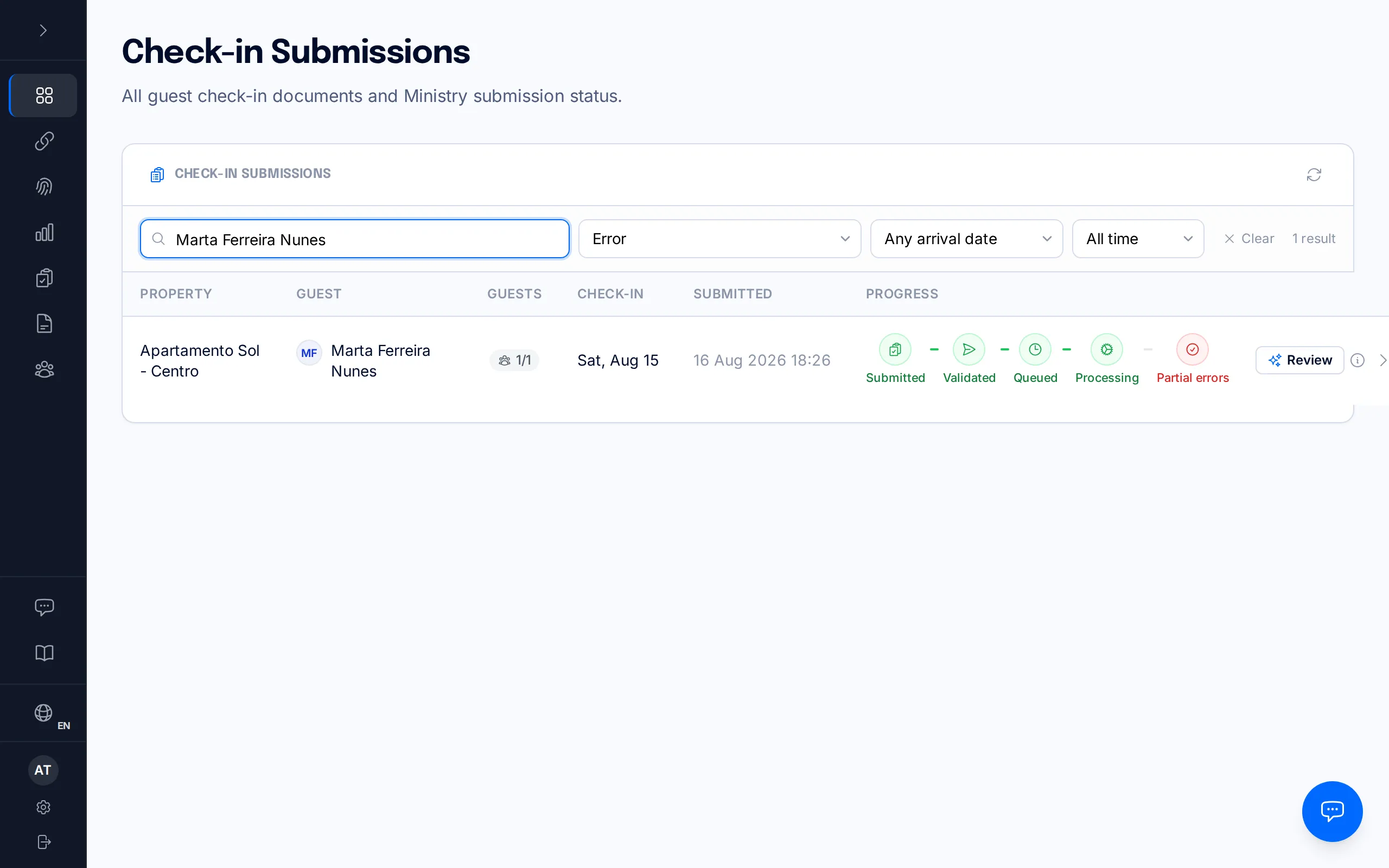
When SES Hospedajes rejects a report, it doesn't disappear from your dashboard — it stays in Submissions, with a visual flag on its filing pipeline. To see them all together, open Submissions and filter by status "Error" — you'll get only the reservations the Ministry sent back with a problem.
Each row shows a small pipeline — Submitted, Validated, Queued, Processing, and the final outcome — and when something fails, that last step turns red and reads "Partial errors" or "Rejected" instead of "Accepted".
Open the detail
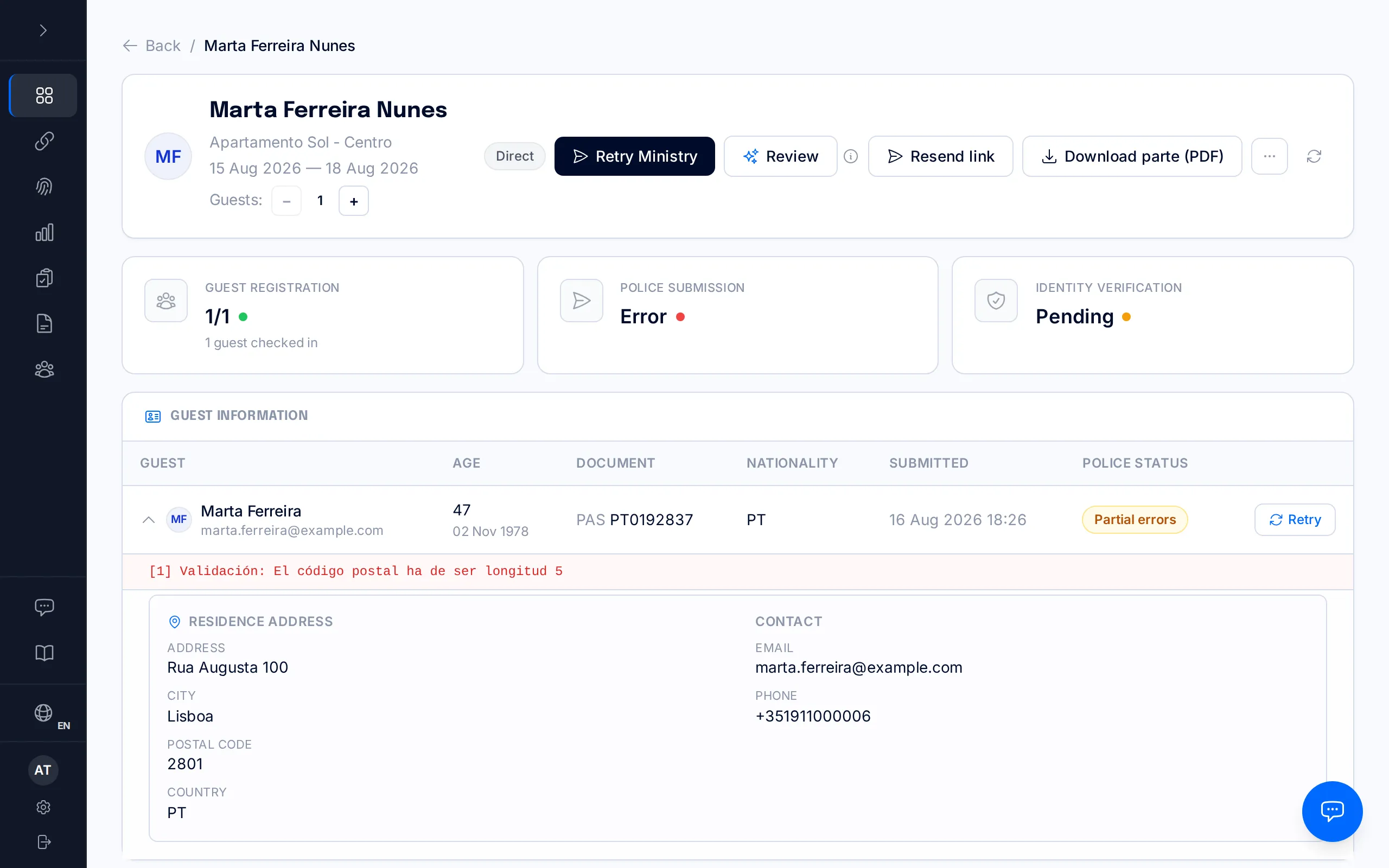
Click the row to open its full detail page. Near the top, the "Police Submission" card shows "Error" in red, and further down, next to each affected traveller, you'll see the "Partial errors" or "Rejected" label and the exact text the Ministry returned.
That text is literal — it's SES Hospedajes' own response, not a BookCheckin translation. For example, for the case in this manual SES returned: "[1] Validación: El código postal ha de ser longitud 5" ("the postal code must be 5 digits long"). It's the most reliable clue you have — it almost always names, precisely, which field needs fixing.
The most common errors
Postal code: SES requires exactly 5 digits. An incomplete code, one with letters, or one copied from another country (as in the example above) is always rejected. The same applies to the municipality code when the filing includes one.
Split compound surnames: if a surname like "Del Pino" or "De la Torre" is stored split in a way that leaves the particle ("DEL", "DE LA"…) alone in the first- or second-surname field, the Ministry rejects it as an incorrect value.
Nationality or country code: a malformed country code, or one inconsistent with the guest's document, also triggers a validation error.
Duplicate submissions: if the same document number was already reported for that reservation, SES returns a duplicate-communication error instead of creating a new report.
Document support-number format: a DNI support number is 3 letters plus 6 digits (e.g. BMP123456); a NIE or TIE support number is the letter E plus 8 digits (e.g. E12345678). Any other shape is rejected.
Credential or authentication errors: if the Ministry username or password has changed or is incorrect, the submission fails on authentication before it even reaches guest-data validation. Re-enter the username and password from the property's Legal tab.
Establishment code: "No existe un establecimiento para ese código" means SES does not recognise the establishment code stored on the property — it is not a problem with any guest, which is why "Review" is not offered for this error. Copy the code fresh from the SES Hospedajes portal ("Mis datos registrados" → "Lista de establecimientos") and correct it in the property's Legal tab: the reservation shows a notice that takes you straight to that field. Then cancel the submission and re-file the corrected reservation (step 4).
Fix the data
If SES rejected every guest on the reservation because of a guest detail (a postal code, a surname, a document number…), correct that guest with "Edit" next to them: saving re-sends the whole reservation to the Ministry. "Review", in the page header, fixes some of these errors automatically. Do not use "Edit" this way if any guest on the reservation was accepted — it would send the accepted guests again too.
In every other case — an establishment-code rejection, or a reservation where some guests were accepted and others rejected — the route is to cancel and file again, because SES Hospedajes has no operation to "edit" a report it already holds. First cancel the submission from "More actions → Cancel submission": the guest's check-in link stays active, but the report is no longer filed.
Once the submission is cancelled, two actions appear next to each guest: "Reset registration" blanks their details so they re-enter them on the check-in form — useful when the guest themself entered the bad value, like an address or postal code. It asks you to confirm before anything is cleared, and the slot is then badged "Reset — awaiting new submission" so you can see at a glance that you are waiting on the guest. "Remove" is a different, more drastic action: it deletes the guest from the reservation entirely, for when they were added by mistake.
Once the guests causing the problem are fixed — or removed — the "Re-file corrected submission" button reports the whole reservation to the Ministry as a fresh lote. If the cause was not the guests but the property — like the establishment code — correct it first in the Legal tab and re-file straight away, without resetting or removing anyone. If SES refuses the cancellation, "Re-file corrected submission" does not appear. In that case, once the cause is corrected and only if no guest on the reservation was accepted, open "Edit" on a guest and save: saving re-sends the whole reservation. Otherwise, contact support.

Cancelling, resetting, removing and re-filing are only available to owner or manager accounts. Staff can see the error and can use "Edit" on a reservation SES rejected in full.
Resubmit
"Retry Ministry", in the page header, sends the guests who never ended up filed: those of a submission that failed before it reached the Ministry (a one-off connection hiccup, wrong credentials) and those not sent yet. In those cases there is nothing to cancel.
What this button does not do is send again a guest who is already on file as submitted — whether the Ministry accepted or rejected them. If you press it on a reservation SES already rejected, the rejected guests are not sent again: only guests not sent yet go out, if there are any, and if there are none the page tells you so and nothing is sent. For the rejected guests, follow step 4: "Edit" on the guest when SES rejected every guest because of a guest detail; otherwise, cancel the submission and re-file the corrected reservation. The same action appears as "Retry" next to each guest and does exactly the same thing.
Errors that fix themselves
Not every error needs you to step in. BookCheckin automatically reviews every report the Ministry sends back with an error and, for a specific, limited set of cases, fixes it and resubmits it without you doing anything: a duplicate document number within the same reservation (keeps the most recent one), a blank guest slot that slipped into the filing (excluded from the lote), a nationality or country code in a different format than SES expects (normalized to the 3-letter standard), and a compound surname split in a repairable way, like a stray "DEL" left alone in the first-surname field (automatically recombined).
The error in this manual — the postal code — isn't on that list: BookCheckin can't invent a valid postal code, so that kind of error always needs you (or the guest, via "Reset registration") to fix it. The same goes for a malformed email, a name the Ministry rejects outright, an establishment code SES does not recognise, or any error the system doesn't recognise.
The legal 24-hour deadline to report to SES Hospedajes still applies from the guest's check-in, even while an error is unresolved. Responsibility for the filing sits with the property's account holder (RD 933/2021) — don't wait for it to fix itself if the error isn't one of the automatic ones.
Reservation report (RH)
Besides each guest's check-in report, BookCheckin sends the Ministry, through SES Hospedajes, a reservation report (in the system, "Alta de Reservas de Hospedaje", or RH) for each booking with a check-in link. It carries the booking's details — the property, the arrival and departure dates and a guest contact — and it doesn't replace the guest check-in report, which is filed separately.
The Ministry gives its answer after the report is sent: BookCheckin files it and, a little later, checks the result. If the Ministry rejects it, the booking shows "RH rejected" and, under "Ministry response", the exact text it returned; we also email you if the "Ministry submission status" notice is turned on. The most common cause is a missing guest phone number or email: SES requires at least one on every reservation report. The arrival and departure dates are required too.
To fix it, open Links, find the booking and open its reservation report section. Check the Ministry's message, add or correct the guest's phone or email and press "Resend to the Ministry". You can resend it as many times as you need. If the link is inactive, reactivate it before resending. If the link has no arrival and departure dates, create it again with the stay's real dates. If it keeps failing, write to hello@bookcheckin.com.
The reservation report and the guest check-in report are filed separately: the Ministry rejecting one doesn't affect the other.
Account not authorised
Sometimes the Ministry accepts the saved username, password and codes but rejects the filings with a message such as "[10119] El arrendador no puede realizar ese tipo de comunicaciones" (or "[10120]", which says the account doesn't have web-service operations enabled). It means the SES Hospedajes account isn't authorised for that type of communication: it is a permissions problem on the account, not a mistyped code or a wrong password.
That is why there is nothing to fix in BookCheckin: re-entering the password or the codes won't solve it. The permission depends on your account with the Ministry, and until it is sorted, this property's reports can't be filed. If you're not sure how to resolve it, write to hello@bookcheckin.com and we'll help.
Once the permission is sorted, open Submissions, open each affected booking and press "Retry Ministry". Rejected reports aren't resent on their own.
Frequently asked questions
Do I need to do anything when I see "Partial errors" on a reservation?+
It depends on the error. If it's one BookCheckin fixes automatically (duplicates, blank guest slots, country-code format, surname particles), it gets resubmitted on its own on the next cycle. For everything else — like a postal code — you need to fix the data and resubmit yourself, following the steps in this manual.
What's the difference between "Partial errors" and "Rejected"?+
They are the two outcomes the Ministry returns for a submission with an error: "Rejected" means it sent back the whole lote; "Partial errors" means it rejected the communication of one or more guests in the lote. In both cases, treat the guests of that submission as not registered until you fix the cause and send them again. The text next to each guest tells you exactly what went wrong.
Can I edit a guest's data directly once it's been submitted?+
SES Hospedajes has no edit operation: a report SES already holds can only be cancelled and filed again. If SES rejected every guest on the reservation, "Edit" on the guest saves the correction and re-sends the whole reservation. Otherwise, correcting a guest who has already been sent means cancelling the submission, changing what needs changing ("Reset registration" or "Remove") and re-filing the corrected reservation.
If I fix the error after the 24-hour window, do I still have a legal problem?+
Yes. The 24-hour deadline from the guest's check-in doesn't pause because there's a pending error — responsibility for filing on time sits with the property's account holder, under RD 933/2021. Fix it and resubmit as soon as you can.
Related manuals
Create and send a check-in link
Generate a manual check-in link for a walk-in guest or a property without a PMS, and share it however you like.
How a check-in works, from start to finish
The whole journey of a traveller registration: from sending the link to the Ministry accepting the guest's report, and what you can do at every step in between.
Getting started: company, property and SES credentials
Set up your account, your first property, and get everything ready for your first check-in.