
SES Hospedajes: what it is, how to register and comply in 2026
SES Hospedajes is the Spanish Ministry of the Interior platform through which tourist accommodations report their guests’ data. Here is what it is, who it affects, and how to comply effortlessly.
Start freeIn short
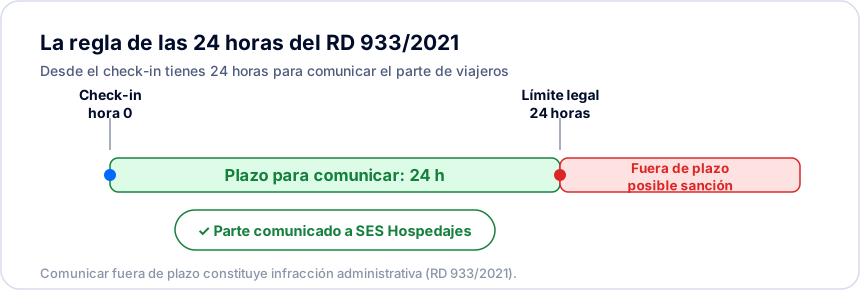
SES Hospedajes is the Spanish Ministry of the Interior platform through which every tourist accommodation in Spain reports its guests’ data. It replaced the older Webpol and Hospederías systems and became fully operational at the end of 2024. The report must be filed within a maximum of 24 hours of the guest’s arrival, under Royal Decree 933/2021.
What is SES Hospedajes?
SES Hospedajes is the digital platform of the Spanish Ministry of the Interior through which accommodation establishments report guest data to the authorities.
It is part of the SES system (Sistema de Entrada de Viajeros) and replaces older reporting systems such as Webpol and Hospederías. It became fully operational at the end of 2024.
The goal is to centralise and digitise traveller registration, which until now was handled with paper forms or scattered systems.
Official sources
- hospedajes.ses.mir.es— Official SES Hospedajes portal (Ministry of the Interior)
- BOE-A-2021-17461 — Royal Decree 933/2021— Consolidated text in the Spanish state gazette
- interior.gob.es— Ministry of the Interior — institutional information
Who must use SES Hospedajes?
The obligation applies to every establishment carrying out accommodation activity, regardless of size.
- ✓Hotels, hostels, and guest houses.
- ✓Tourist apartments and homes for tourist use.
- ✓Rural houses and rural tourism accommodation.
- ✓Campsites and camping areas.
- ✓Platforms and managers that intermediate in renting these accommodations.
Registering: arrendador, establishment and the two credentials
Before you can file any report you have to register at the Ministry of the Interior’s electronic office, identifying yourself with a digital certificate, the electronic DNI, or Cl@ve (and, to sign the registration, being enrolled in Cl@ve Firma or having autofirm@ installed). You first register the entity — the arrendador, the company or individual holding the activity, the party under the obligation — which gets an arrendador code; you then register each establishment, each physical property, and each one gets its own code. Both codes are 10 characters or fewer and must not be confused with the regional tourism registration number (VT, VFT…).
Once done, you have two separate credentials: the application-access ones (your document number) and the web-service ones, managed per entity under “Servicio de comunicación” → “Credenciales” — choosing the entity if you manage more than one — whose password is never shown, only changed. Our step-by-step guide walks through every screen of this process.
Related resources
- How to register with SES Hospedajes step by step— The full registration journey, screen by screen
- SES Hospedajes not working: common errors and fixes— The 401 credentials error and the other rejections, with the fix for each
What data to submit and within what deadline
For each guest you must report a broad set of data: identification (name, surnames, document type and number), date of birth, nationality, sex, contact and residence details, plus information on the reservation, dates, and payment.
Minors’ data, including those under 14, must also be registered, indicating their relationship to the responsible adult.
The report must be made within a maximum of 24 hours from the guest’s arrival (check-in).
| Document | Who uses it | Is the support number sent? |
|---|---|---|
| DNI | Spanish citizens | Yes |
| NIE / TIE | Foreigners resident in Spain | Yes |
| National identity document of another EU country | EU citizens | No |
| Passport | Any nationality | No |
The support number is three letters and six digits on a DNI, and an "E" followed by eight digits on a NIE. It is never sent with a passport.
How to comply with SES Hospedajes effortlessly
Doing this filing manually, guest by guest, consumes hours and invites errors. BookCheckin automates the whole process end to end.
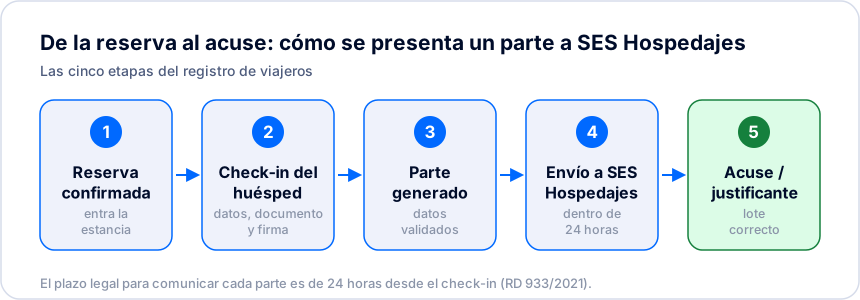
The guest completes online check-in before arrival: they scan their document, review their data, and sign. BookCheckin validates the information and files it with SES Hospedajes within the legal deadline, and keeps the receipt.
The cases that raise the most questions: minors, foreigners, deadlines and errors
The general mechanics of SES Hospedajes are simple, but most real questions come up in specific situations: how to register a minor, which document is valid for a foreign guest, what to do if you miss the 24-hour deadline, or how to correct a report you already filed. We cover each in its own guide:
| Infringement tier | Fine range | Typical case |
|---|---|---|
| Minor | €100 to €600 | Filing the report after the 24-hour deadline |
| Serious | €601 to €30,000 | Not reporting the stay at all |
Amounts under Organic Law 4/2015. The actual classification is decided by the sanctioning authority: a late filing usually fits as a minor infringement; not reporting the stay at all can be serious.
Related resources
- Registering minors in SES Hospedajes— The 14-year rule and the relationship field, mandatory and a common cause of rejection
- Foreign guests: passport, NIE and EU ID— Which document is valid for each nationality, and when to send the support number
- Late SES Hospedajes report— What happens if you miss the 24-hour deadline: minor or serious infringement
- Traveller registration in Catalonia and the Basque Country— Why these two regions do not use SES Hospedajes
- Traveller report or booking report— The two SES communication types, and which one goes at each moment
How to file a traveller report on SES Hospedajes step by step
Procedure for submitting guest data to SES Hospedajes within the legal 24-hour window.
- 1
Open the SES Hospedajes portal
Go to https://hospedajes.ses.mir.es in a browser. The portal is the Spanish Ministry of the Interior’s national entry point to the system.
- 2
Identify yourself with your application-access credentials
Sign in with your personal username — your document number — and your application password, the one you obtained when you completed registration as the obligated party. These are not the web-service credentials: those are only for a connected system filing reports automatically.
- 3
Upload the XML batch (lote) with the traveller records
Generate an XML file with the 21 mandatory fields per guest and the soporteDocumento field, or fill in the data manually in the form. Each grouped submission is called a lote.
- 4
Confirm the batch submission
Validate the lote contents and confirm it. The system processes the records and rejects any with incomplete or malformed data, so you can fix them before the 24-hour mark.
- 5
Save the lote code as proof of filing
Once accepted, SES Hospedajes returns a unique lote code. Keep it: it is the legal evidence that the report was filed on time and discharges your RD 933/2021 obligation.
Frequently asked questions
Is SES Hospedajes mandatory?+
Yes. Every accommodation establishment in Spain must report guest data through the Ministry of the Interior’s SES system.
What happened to Webpol and Hospederías?+
The old Webpol and Hospederías systems have been replaced by the SES Hospedajes platform, which centralises traveller reporting nationally.
How long do I have to submit the data?+
The report must be made within 24 hours of the guest’s arrival. With BookCheckin the filing is automatic and happens in seconds.
Do minors need to be registered?+
Yes. Minors’ data, including those under 14, must also be reported, indicating their relationship to the responsible adult.
What happens if I file the report late?+
A late report is already a breach, and it usually fits as a minor infringement (€100 to €600). Even so, filing it late is better than not filing at all: not reporting the stay can be classified as a serious infringement (€601 to €30,000) under Organic Law 4/2015.
Can I correct or cancel a report I already filed?+
SES Hospedajes has no "edit" option for a submitted report. To correct a field, you cancel the batch (using the code the system returned when it was accepted) and file the whole stay again with the correct data.
Which document is valid for a foreign guest?+
A passport is valid for any nationality. A foreigner resident in Spain identifies with their NIE/TIE, and an EU citizen may also use their national identity document. The support number (three letters and six digits on a DNI; an "E" and eight digits on a NIE) is only sent with a DNI or NIE, never with a passport.
Can I keep a copy of the guest’s ID or passport?+
No. Since June 2025 the Spanish DPA (AEPD) has clarified that keeping a copy of the document is not permitted — no photocopy, scan, or photo. What the law requires you to collect is the Annex I data, not an image of the document.
How do you log in to the SES Hospedajes portal?+
With an electronic ID method: an FNMT digital certificate, an electronic DNI, or Cl@ve. That is separate from the web-service credentials (username and password) the entity uses to file reports from a connected system, managed per entity under “Servicio de comunicación” → “Credenciales”, not per establishment.
Does SES Hospedajes also apply in Catalonia and the Basque Country?+
No. Those two regions have their own police forces, and accommodations report guest data to the Mossos d’Esquadra or the Ertzaintza instead of SES Hospedajes. BookCheckin files to the national SES Hospedajes automatically, and serves Catalonia a different way: you save the Mossos establishment identifier on the property, and BookCheckin prepares the guest file in the official Mossos format for you to upload yourself at registreviatgers.mossos.gencat.cat. For the Basque Country, with the Ertzaintza, it works the same way: you save the establishment code the Ertzaintza issued you on the property, and BookCheckin prepares the XML file for its Registro Hostelero for you to upload at the Ertzaintza portal yourself.
Keep exploring
Royal Decree 933/2021 explained
Regulatory guide · Last updated: 21 September 2026The libro registro de viajeros: from the paper book to the computerised register
Regulatory guide · Last updated: 24 May 2026The traveller report: what it is and how to file it
Automate your SES Hospedajes reporting
Let BookCheckin file the traveller report for you — accurate and on time.
Start free