
When SES Hospedajes “is not working”, it is almost always a specific data error, not a system outage. Here is a table of the most common error messages, what each one means, and how to fix it.
In short
When SES Hospedajes “is not working”, it is rarely down: apart from the Ministry’s scheduled maintenance windows, the system is usually up, and what fails is a specific field it rejects or an access problem with the credentials. The same five or six cases explain almost every rejection: a non-existent or inconsistent postal code, split compound surnames, a nationality typed by hand, an empty or duplicate document number, and the 401 credentials error.
Each submission generates a batch that goes through “pending”, “correct” or “with errors”: filing is not being accepted. When a report bounces, find the field flagged in the message, fix it, and re-file; the 401 error is almost always an extra whitespace copied into the username or password.
When SES Hospedajes “is not working”, it is rarely down
It is one of the most frequent searches for any accommodation: “SES Hospedajes not working”. The reality is that, apart from the Ministry’s scheduled maintenance windows, the system is usually up. What almost always fails is a specific traveller data field the system rejects, or an access problem with the credentials.
The good news is that these errors are limited and repetitive: the same five or six cases explain the vast majority of rejections. If you know how to read the message, each has a quick fix. This guide compiles them from the rejections we handle every day in production, with a table you can use as a reference whenever a submission bounces.
Before touching anything, it helps to understand how the system tells you whether a submission went well or badly.
How to know if your report was accepted: the batch status
Each submission to SES Hospedajes generates a “batch”, identified by a number. Filing is not the same as being accepted: the batch goes through several states until it is registered or rejected. These are the ones you will see:
| Batch state | What it means | What to do |
|---|---|---|
| Pending | The submission has been received and the system is still processing it. | Wait a few minutes and check the status again. Do not re-file the same report: you would create a duplicate. |
| Correct | The batch has been accepted and the report is registered within the deadline. | Download and keep the receipt. There is nothing else to do. |
| With errors / to be fixed | The system has rejected the batch because of one or more incorrect fields. | Find the field flagged in the message, fix it, and re-file the report. |
A report is not filed until the batch shows as “correct”. Always check the status before considering a stay reported.
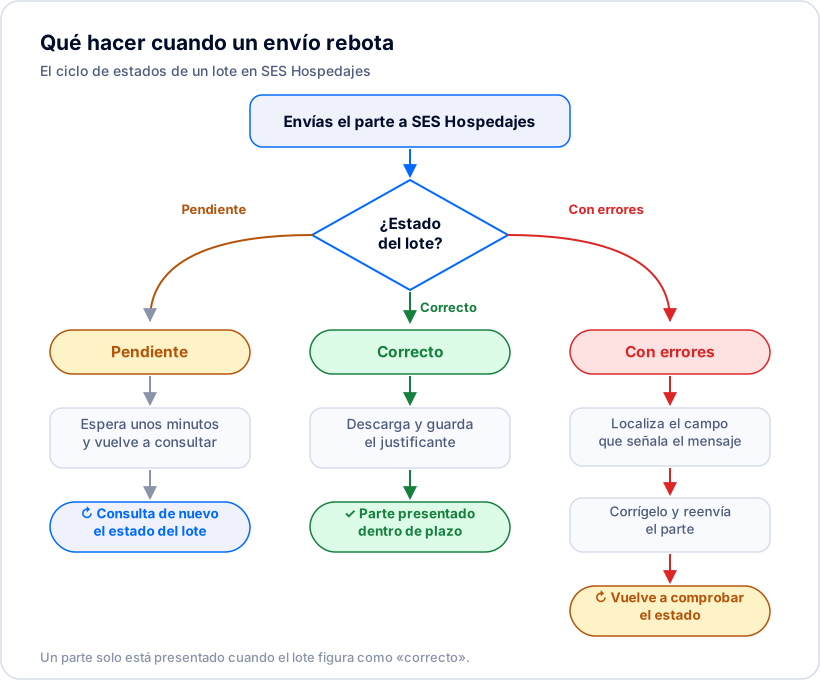
Table of the most common errors and how to fix them
When a batch lands “with errors”, the system indicates the field and the value it rejected. These are the most frequent messages, with their plain-English meaning and how to resolve them:
| System message (approximate) | What it means | How to fix it |
|---|---|---|
| Access error / invalid credentials (401) | The submission-service username or password is not accepted. The most common cause is a stray space copied in. | Re-copy the credentials with no spaces before or after. If it persists, regenerate them in the electronic office. |
| Incorrect postal code or municipality | The postal code does not exist or does not match the municipality entered. | Fix the postal code to a real one for the municipality and re-file. Never leave it blank or enter 00000. |
| Invalid value in the first or second surname | A compound surname has been split badly, leaving a loose particle (“de”, “del”, “van”…) in a field. | Rebuild the full surname in the correct field (e.g. “De la Fuente” together, not “De” and “la Fuente” apart) and re-file. |
| Repeated data / a communication already exists | Two travellers share the same document number, or the same report was filed twice. | Report each document only once. If it is a real duplicate, cancel the extra batch instead of leaving two reports. |
| Mandatory field empty (name, surname or document) | A traveller is missing an essential field, or the batch has an incomplete guest row. | Complete the missing field and remove empty guest rows before re-filing. |
| Invalid nationality or country code | The nationality does not match a country code recognised by the system. | Select the country from the official list instead of typing it; check the code matches the correct country. |
| Email with incorrect format | The traveller’s email address does not have a valid format. | Fix or complete the email; avoid spaces and invalid characters before re-filing. |
The exact wording varies by system version; the messages here are approximate so you can recognise each case. This list reflects the most frequent rejections we handle in production.
The credentials error (401): the most annoying and the easiest
Many accommodations get stuck on the first submission with an access error, even though the credentials look correct. The most common cause is not the password itself but an invisible space that sneaks in when copying the username or key from an email or a document.
The fix is as simple as it is frustrating: re-enter the credentials by hand, or paste them carefully so you do not drag spaces before or after. If it still fails, change the entity’s web-service password under “Servicio de comunicación” → “Credenciales” and try again. When you integrate an external system, make sure it stores the credentials without trimming characters.
Postal codes and addresses the system rejects
The postal-code rejection is one of the most common with foreign travellers or with addresses jotted down by hand at the front desk. The system checks that the postal code exists and matches the municipality; a made-up, incomplete, or wrong-town code makes the batch bounce.
The fix is always to enter a real postal code consistent with the traveller’s address, never to leave it blank. Here it pays not to guess: if you do not have the right value, it is better to ask the guest than to risk a wrong code that bounces again.
Compound surnames, duplicates and nationalities
Spanish compound surnames (“De la Cruz”, “Van der Berg”) are a classic source of rejections when they are split incorrectly and a loose particle is left behind. The fix is to rebuild the full surname in its field, respecting the particles.
Duplicates appear when two people share a document number or when the same report is filed twice. Each document must be reported only once; if you spot a repeated submission, cancel it rather than leave it. And nationalities fail when typed by hand instead of chosen from the official country list: always select them from the list so the code is valid.
When SES Hospedajes really is down
Sometimes the problem is not you: the Ministry runs maintenance windows and there can be occasional service outages. If the system does not respond at all and it is not about your data or credentials, the sensible thing is to wait and retry later.
The key is not to miss the 24-hour deadline over an outage that is not your fault. Keep the data you have already collected to hand and re-file it as soon as the service is back; a documented incident of the official system is very different from your own oversight. A system that retries the submission automatically covers you precisely in these cases.
How BookCheckin turns errors into something you do not have to watch
Handling these rejections by hand, one by one, in the electronic office is tedious and easy to forget on a busy arrival day. BookCheckin automates it: it validates the data before sending, files the report with SES Hospedajes within the deadline, and watches the batch status until acceptance.
When a submission bounces, it does not leave you in the dark: it identifies the exact guest and field to fix. Some errors —a duplicate document, a badly split surname, an invalid country code— it fixes and re-files automatically. For those that need a value we must not invent, such as a postal code, it tells you precisely what to ask for so you can resolve it in seconds.
And if a report already filed had a wrong field, you can cancel and correct it from the platform: we handle the cancellation and the new communication so the stay ends up correctly registered. All with the receipt for each batch stored in case there is ever an inspection.