
The guide to registering with SES Hospedajes from scratch in 2026: which access to use, how to register the entity and each establishment, and where to find your codes and your web-service username.
In short
Registering with SES Hospedajes is free and is done at the Ministry of the Interior’s electronic office, inside the “Hospedajes y alquiler de vehículos” group, through “Acceso al registro de establecimientos y entidades”. You identify yourself with Cl@ve or a digital certificate and, to sign the registration, you need to be enrolled in Cl@ve Firma or have autofirm@ installed. You first register the entity (the arrendador) and then each establishment; once done, you have two separate credentials: the ones for signing in to the application and the web-service ones.
Before filing any report, turn on the “Envío de comunicaciones por servicio web” box under “Mis datos registrados” and note your lessor code, each establishment’s code and the web-service username. Catalonia and the Basque Country do not use SES Hospedajes: there, the report is filed with the Mossos d’Esquadra or the Ertzaintza.
Before you start
Gather this before entering the electronic office:
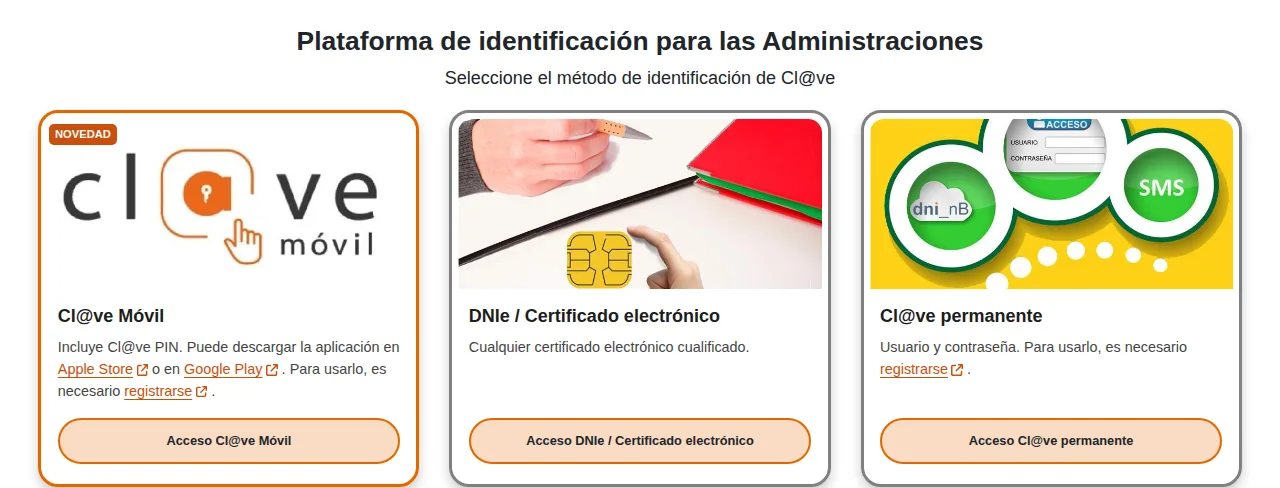
- ✓An electronic identification method: Cl@ve Móvil, the electronic DNI or a digital certificate, or Cl@ve permanente. To sign the registration you also need to be enrolled in Cl@ve Firma, or have autofirm@ installed if you are signing with a local certificate.
- ✓The holder’s (the arrendador’s) details, and the details of every property you are going to register.
- ✓An email address you check often: if you ever need to recover access to the application, the system asks for it together with your document number.
- ✓If you manage accommodations for several owners, be clear on which holder each property belongs to: each owner running their own activity registers as a separate entity.
Step 1. Open “Hospedajes y alquiler de vehículos” at the electronic office
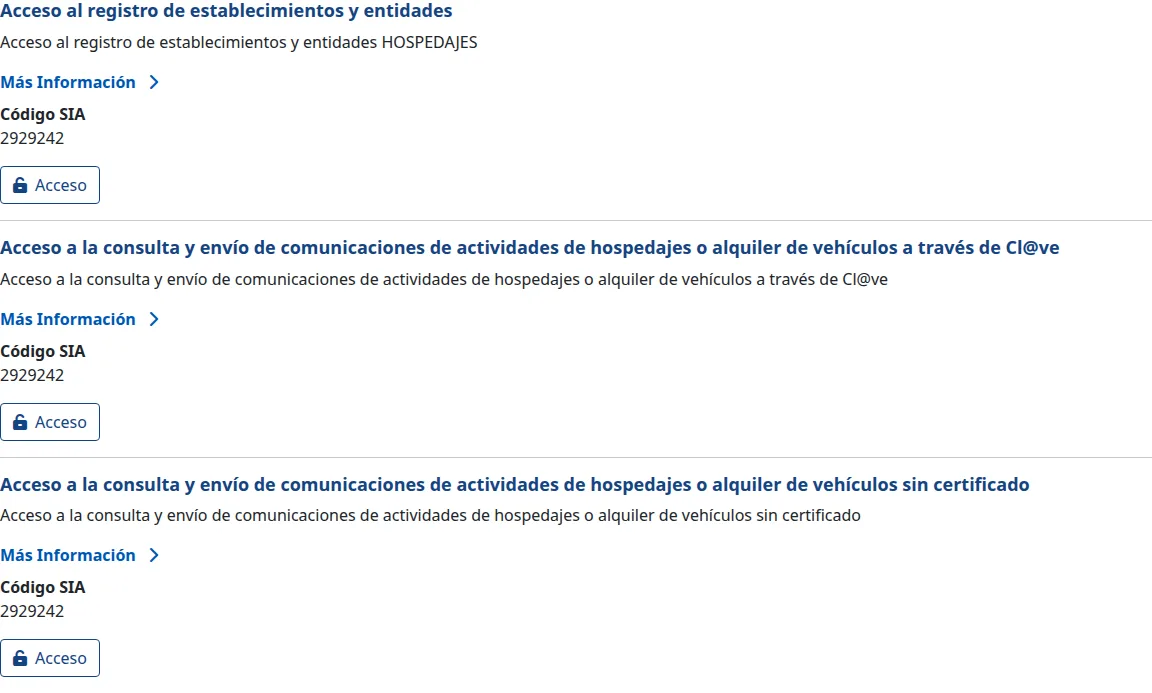
The Ministry of the Interior’s electronic office groups this procedure under “Hospedajes y alquiler de vehículos”. Inside you will find three similarly-named accesses, and it is easy to confuse them:
| Access | What it is for |
|---|---|
| Acceso al registro de establecimientos y entidades | Registering for the first time: the entity, the establishments, the codes and the web-service credentials. This is the one you need in this guide. |
| Acceso a la consulta y envío de comunicaciones… a través de Cl@ve | Querying and filing reports once you are already registered, identifying yourself with Cl@ve. |
| Acceso a la consulta y envío de comunicaciones… sin certificado | Querying and filing reports without a digital certificate, with a username and password. |
Step 2. Enter through “Acceso al registro de establecimientos y entidades” and identify yourself
Press the “Acceso” button on the first block. It takes you to the Cl@ve identification gateway, where you choose how to prove your identity: Cl@ve Móvil, the electronic DNI or a digital certificate, or Cl@ve permanente.
If the electronic office will not let you in, check your certificate first: an expired one, or one installed in a different browser, is the most common cause.
Step 3. Register the entity (the arrendador)
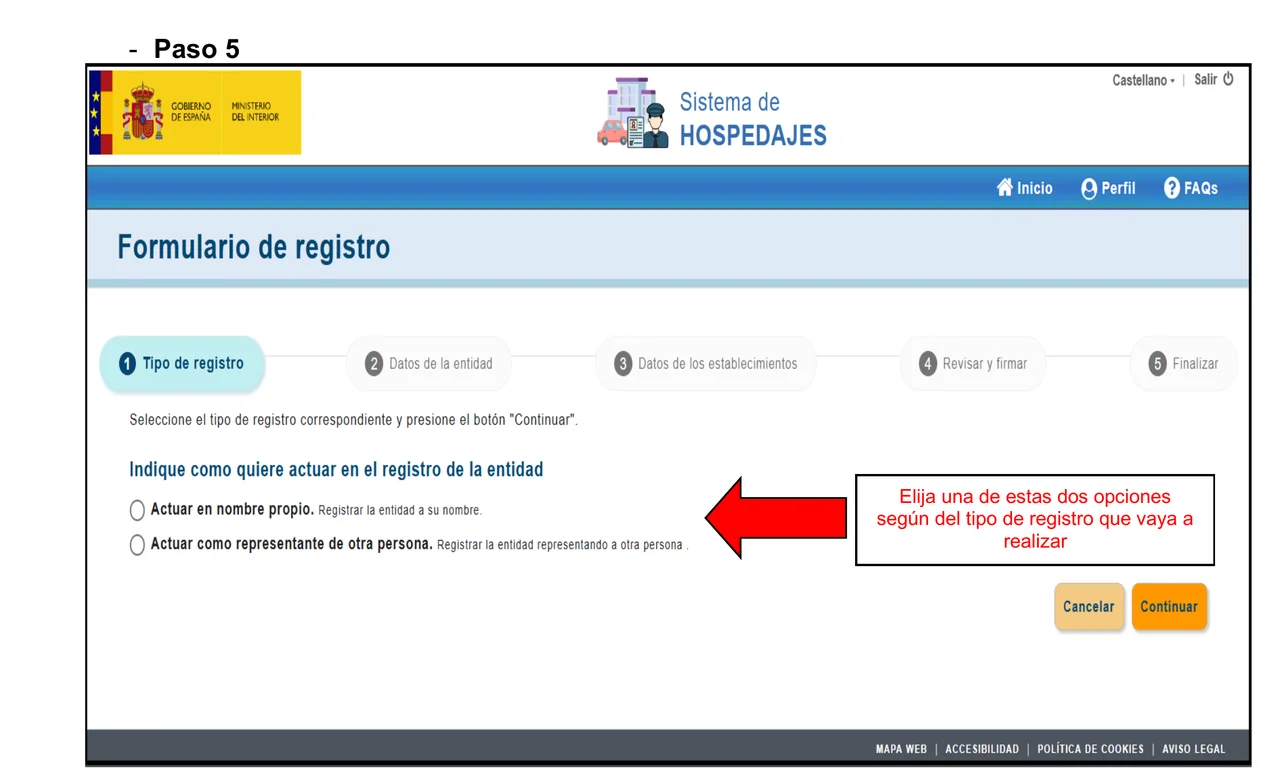
The entity is the party obliged before the Administration: the company or person answering for the hospitality activity. The registration form is a five-step wizard — Tipo de registro, Datos de la entidad, Datos de los establecimientos, Revisar y firmar and Finalizar — and the first thing it asks is whether you are acting in your own name or as someone else’s representative.
The entity’s details are the tax and contact ones: document type and NIF, name or company name, entity type, activity type, address, province, municipality, postcode, email and phone, plus the email for web-service notices. The lessor code is not a field you fill in: the system assigns it once registration is complete.
If several owners run flats on their own —for example, you manage properties belonging to two different owners— each owner is a separate entity with its own registration, even if you operate both from the same tool.
Step 4. Register each establishment
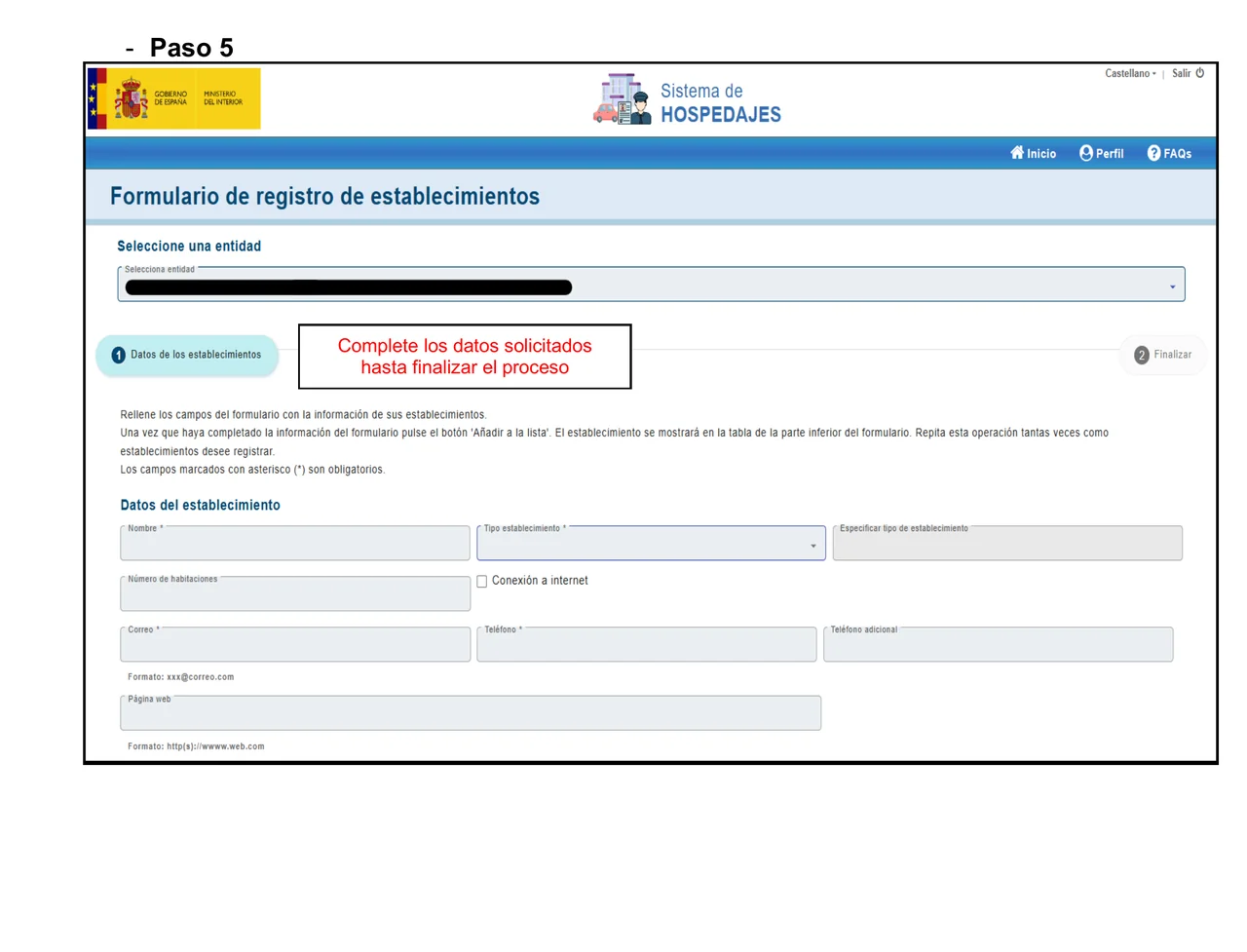
With the entity created, register each physical accommodation separately: a flat, a rural house, a hotel. If you manage ten apartments, you register ten establishments under the same entity.
The establishment registration form asks for: name, establishment type (with a field to specify it if you choose “other”), number of rooms, whether it has an internet connection, contact email and phone, an optional additional phone, and an optional website.
A common mistake: the regional tourism registration number (the one starting with VT, VFT or your region’s equivalent) is not the Ministry’s establishment code. They are two different registers, and the SES Hospedajes code is assigned by the platform itself once you complete this step.
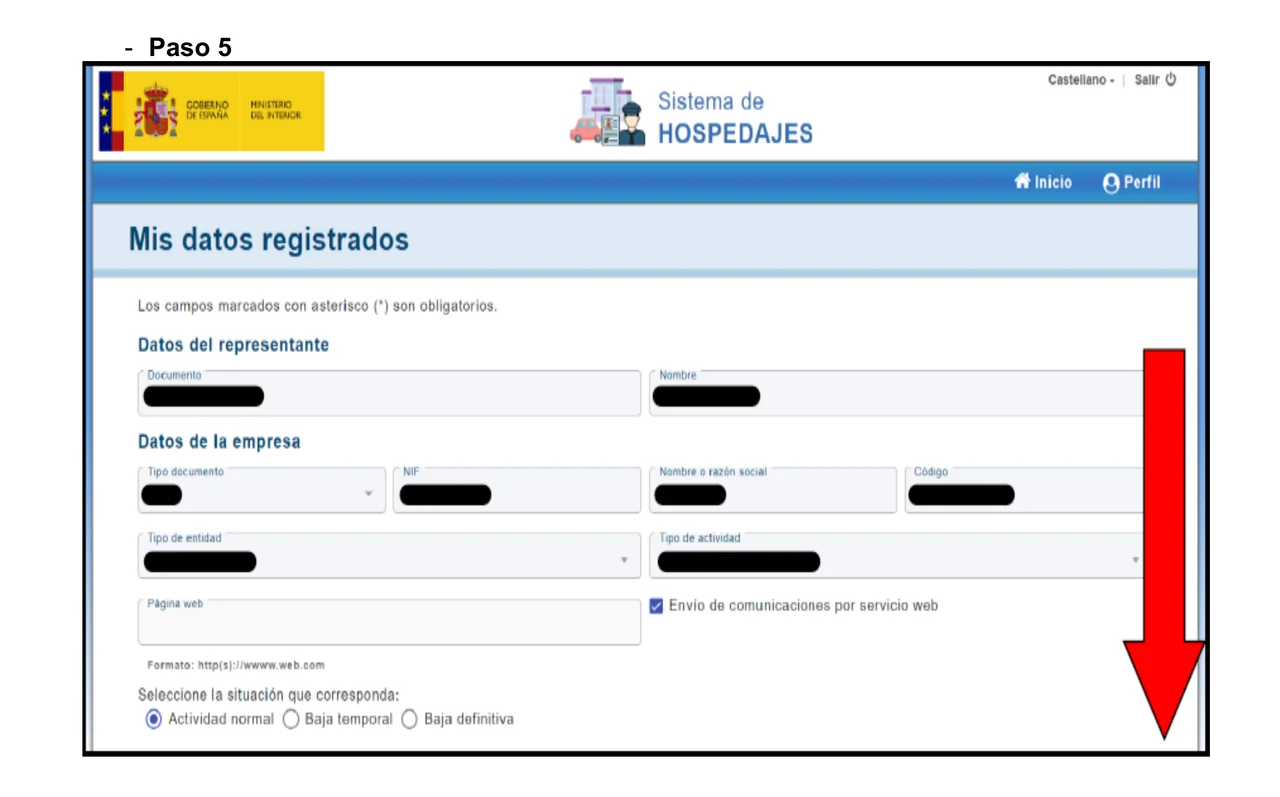
Step 5. Turn on “Envío de comunicaciones por servicio web”
Under “Mis datos registrados” → “Datos de la empresa” you will find the “Envío de comunicaciones por servicio web” box. Turn it on: it is what allows reports to be filed through the web service, whether from a connected tool or your own system.
If you leave it unticked, any attempt to file through the web service fails with a permissions error: the system returns code 10119 (“El arrendador no puede realizar ese tipo de comunicaciones”).
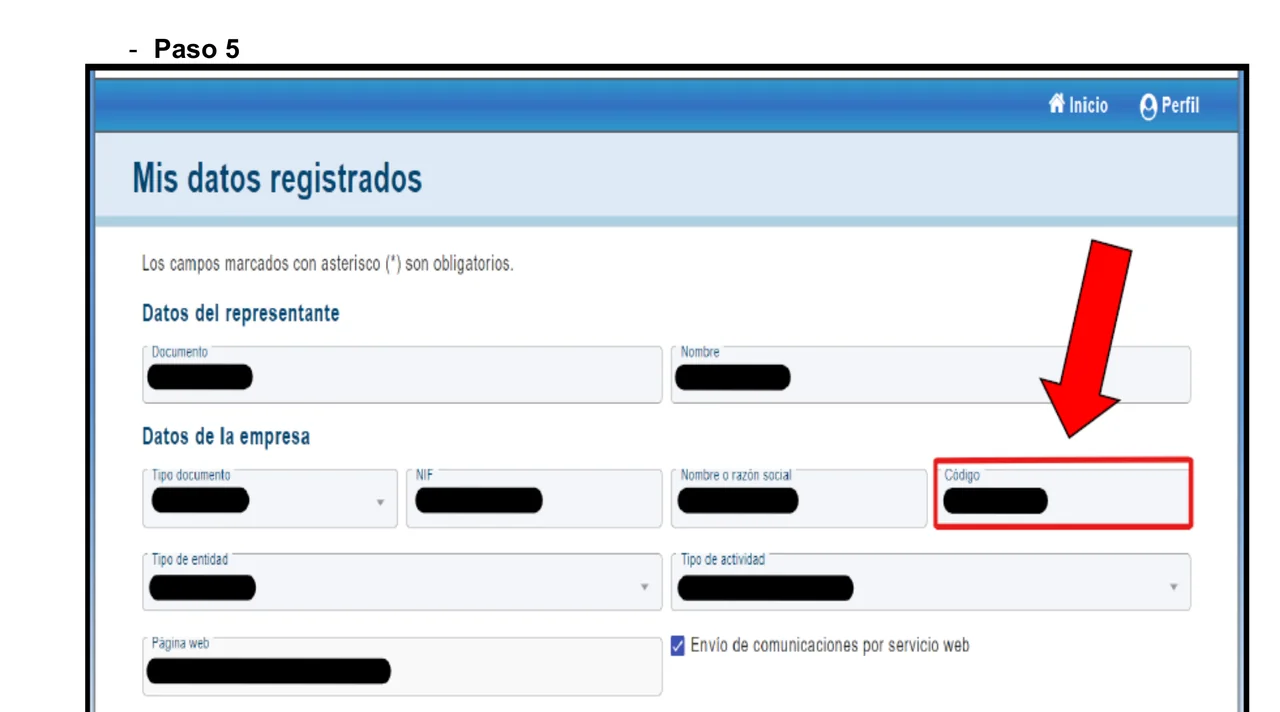
Step 6. Note your lessor code and your establishment codes
Under “Mis datos” → “Datos de la empresa”, the “Código” field is your lessor code. The Ministry assigns it once registration is complete: you do not type it in, you only look it up here.
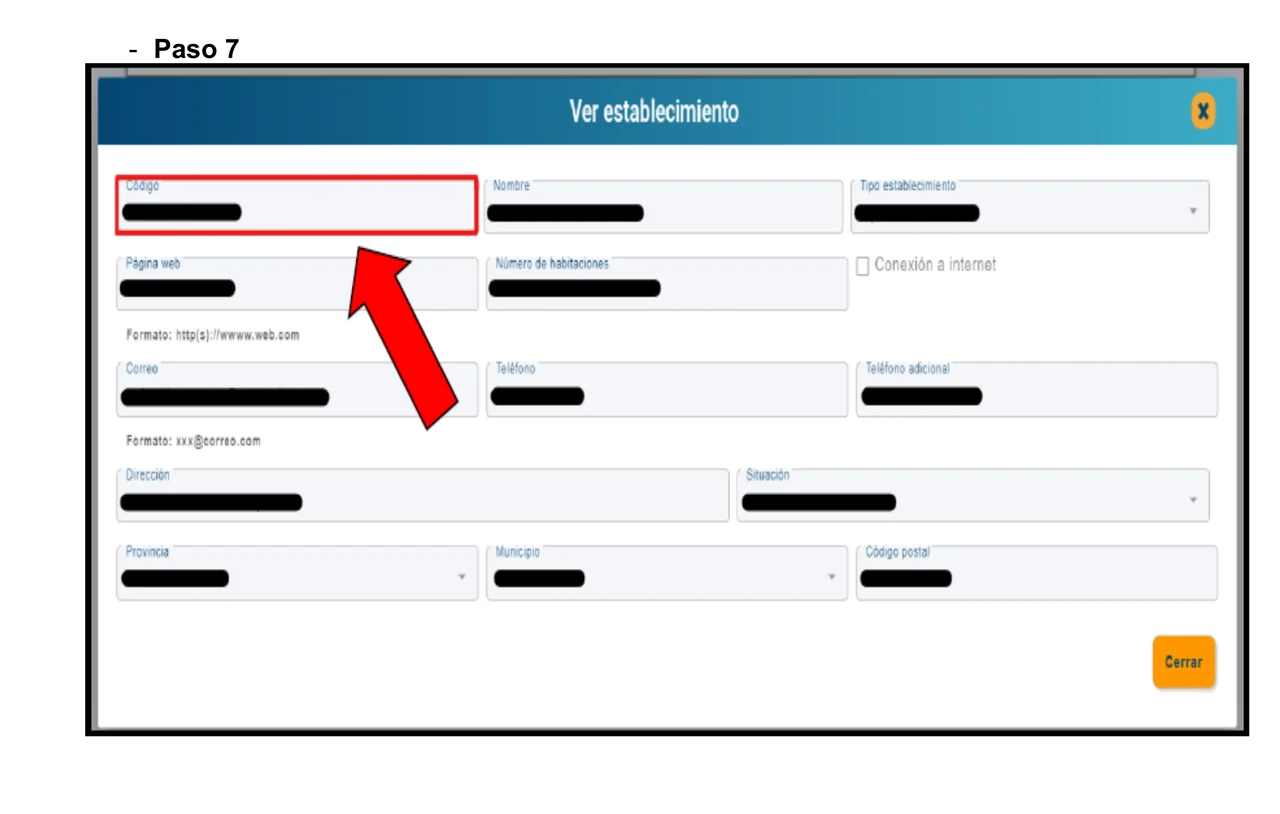
Where to find each establishment’s code
In “Lista de establecimientos”, the first column shows each accommodation’s code. If you open its record with the view icon, the “Ver establecimiento” window repeats the same “Código” field.
Both codes —the lessor’s and each establishment’s— are 10 characters or fewer (for example, 0000000000). If the field in front of you takes more characters, or starts with VT or VFT, it is not the right code: it is the regional tourism registration number, a different register.
Step 7. Get the web-service username and password
Go to “Servicio de comunicación” → “Credenciales”. If your entity is the only one, you will see the web-service username directly; if you manage more than one entity, the system asks you to choose which. There you see the username, the name and the registration date — the password is never shown. The same screen has a section to download the service’s technical documentation.
The web-service username in practice usually ends in “WS”, but that can vary; check it on your screen. Do not confuse it with your personal application username, which is your document number: they are two different credentials, and a connected tool needs the web-service one, not the personal one.
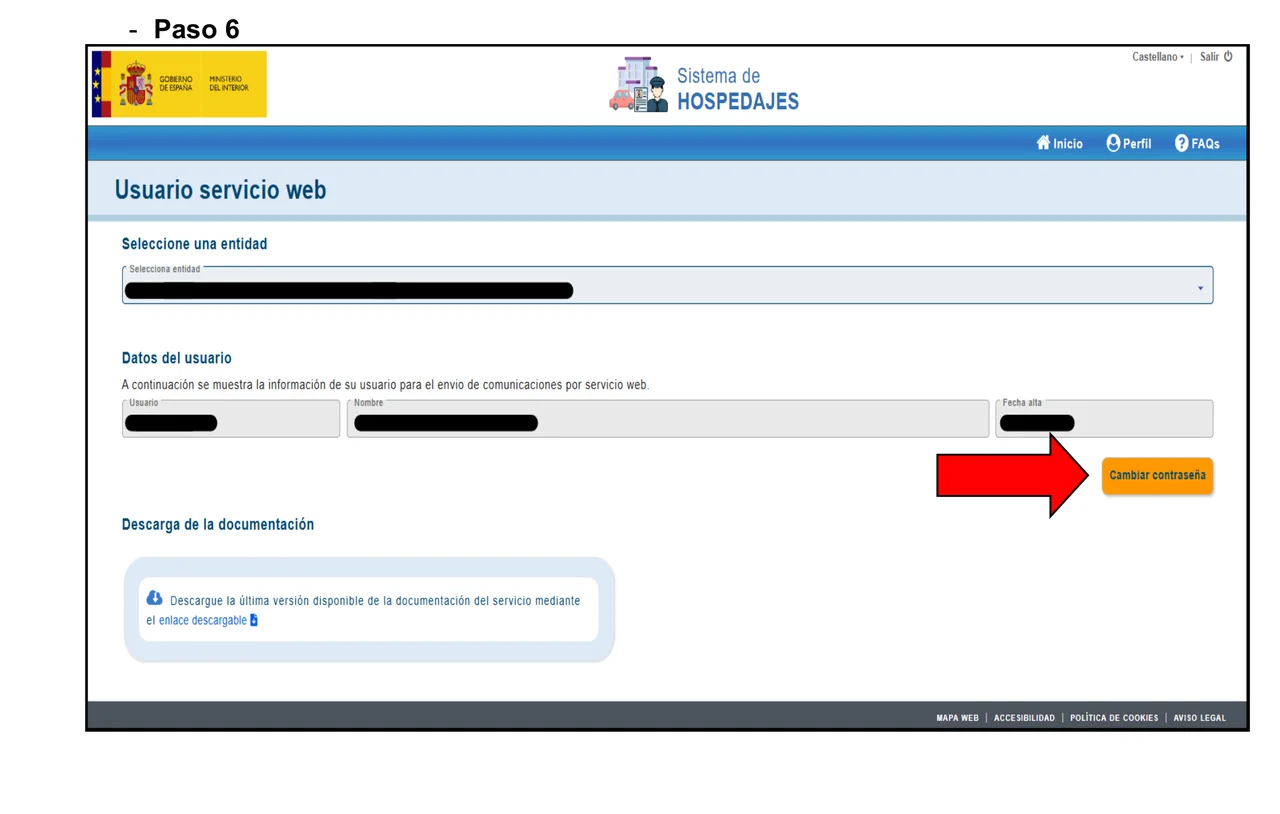
How to change the web-service password
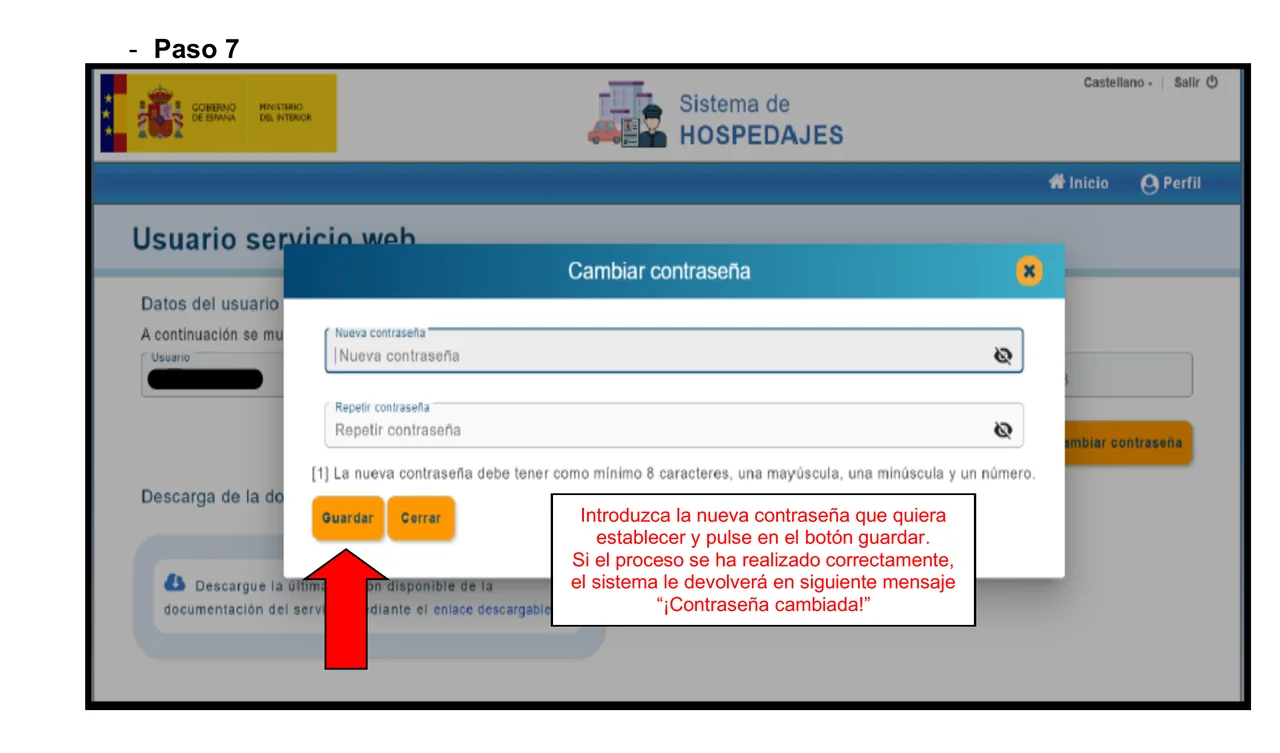
Press “Cambiar contraseña”: it asks for at least 8 characters, with an uppercase letter, a lowercase letter and a digit. On saving you will see “¡Contraseña cambiada!”, and the old password stops working at once, so update any connected tool as soon as you change it.
If you use BookCheckin: where each piece of data goes
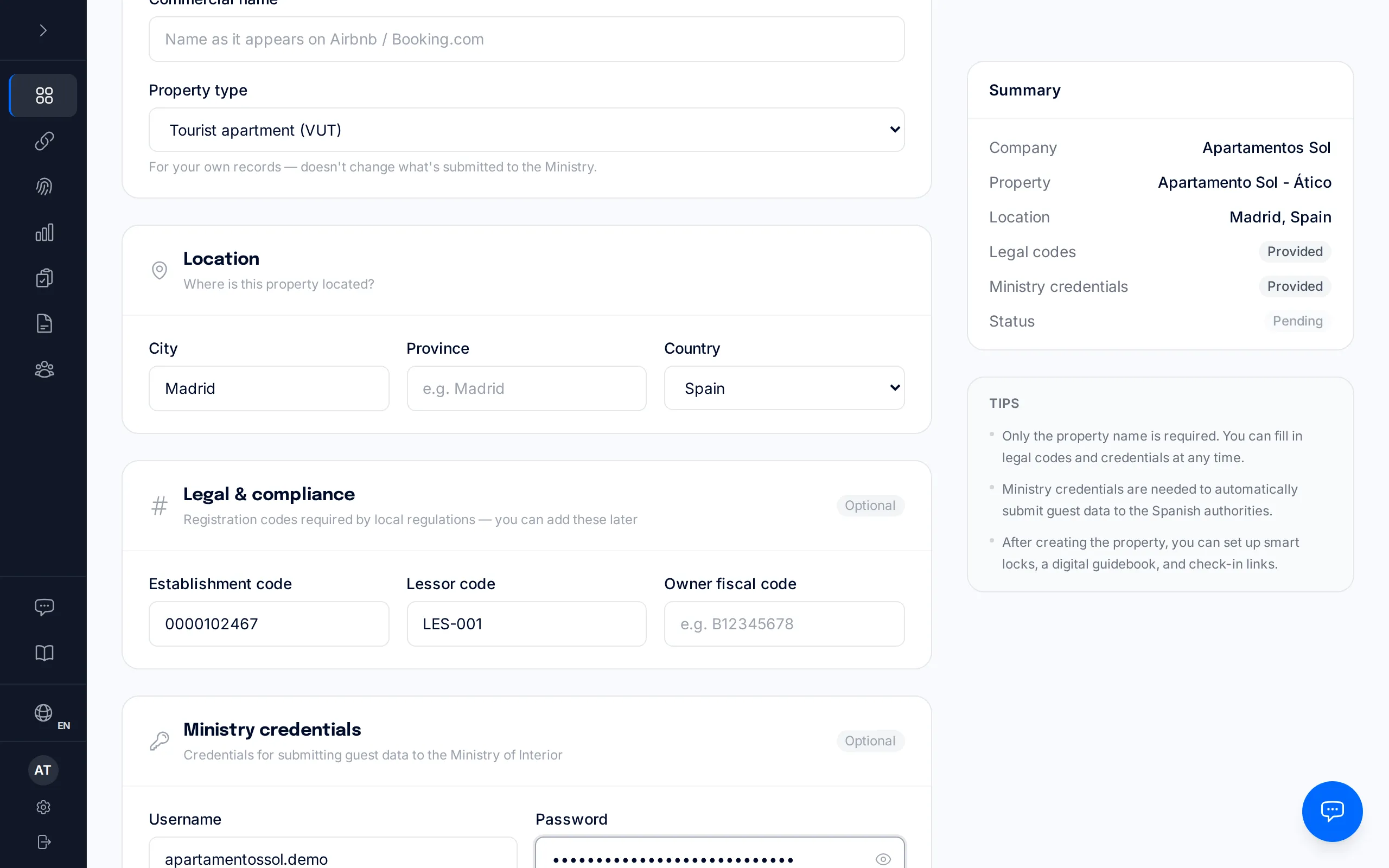
BookCheckin asks for four values: the web-service username and password, the establishment code and the lessor code. The “Probar conexión” button confirms that the username and password authenticate correctly against the Ministry; it does not check the lessor code, which is only validated on the first real submission. BookCheckin does not register you with SES Hospedajes and does not generate any code: you get all four values from the steps above.
Related resources
- Getting started with BookCheckin— Set up your accommodation, save the codes and credentials, and test the connection
Common registration errors
| What you see | Why it happens | How to fix it |
|---|---|---|
| Error 401 when filing | Your personal username (your document number) was used in the web-service field, or the field has a stray space. | Use the web-service username, not the personal one, and check there are no spaces before or after it. |
| Error 10119 | The “Envío de comunicaciones por servicio web” box is unticked. | Turn it on under “Mis datos registrados” → “Datos de la empresa”. |
| The code is rejected or will not save | The regional tourism registration number (VT, VFT…) was pasted instead of the SES Hospedajes code. | Use the code of 10 characters or fewer shown in “Lista de establecimientos”. |
| The web-service password is lost | The password is never shown; it can only be changed. | Use “Cambiar contraseña” under “Credenciales” and update any connected tool. |
| The electronic office will not let you identify yourself | An expired certificate, or one installed in a different browser. | Check the certificate is still valid and open it in the browser where it is installed. |
After registration: the daily routine
Once registered, the daily obligation is to file one report per guest within a maximum of 24 hours from check-in. When a submission fails, it is almost always a specific field to fix, not a system outage.
Catalonia and the Basque Country
If your accommodation is in Catalonia or the Basque Country, this registration does not apply to you: the traveller report is filed with the Mossos d’Esquadra or the Ertzaintza, each with its own register and its own credentials.
How to register with SES Hospedajes
The full registration journey, from the first access at the electronic office to having your lessor code, your establishment codes and your web-service username.
- 1
Open “Hospedajes y alquiler de vehículos” at the electronic office
At the Ministry of the Interior’s electronic office, find the procedure group “Hospedajes y alquiler de vehículos”. There you will see three separate accesses: one for registering, and two more for querying and filing reports once you are already registered.
- 2
Enter through “Acceso al registro de establecimientos y entidades” and identify yourself
This is the access that registers your entity and your establishments. Identify yourself with Cl@ve Móvil, the electronic DNI or a digital certificate, or Cl@ve permanente.
- 3
Register the entity (the arrendador)
Register the company or individual holding the activity: the party obliged before the Administration. If several owners each run their own activity, each one registers as a separate entity.
- 4
Register each establishment
Register each physical accommodation that entity manages. The regional tourism registration number (VT, VFT…) does not replace this step: it is a different register.
- 5
Turn on “Envío de comunicaciones por servicio web”
Tick this box under “Mis datos registrados” → “Datos de la empresa”. Without it, filing reports through the web service fails with a permissions error.
- 6
Note your lessor code and your establishment codes
“Mis datos” → “Datos de la empresa” shows your lessor code; “Lista de establecimientos” shows each accommodation’s code. Both are 10 characters or fewer.
- 7
Get the web-service username and password
“Servicio de comunicación” → “Credenciales” → “Usuario servicio web”, choosing the entity. You see the username there, but the password is never shown: you can only change it.